


Swann Security
4.64.43K Reviews
App Specs
- Version
- 4.9.3
- Updated On
- License
- Free
- Downloads
- 1,000,000+
- Developer
- Swann Communications
- Categories
- Productivity
- Platform
- Android
Screenshots

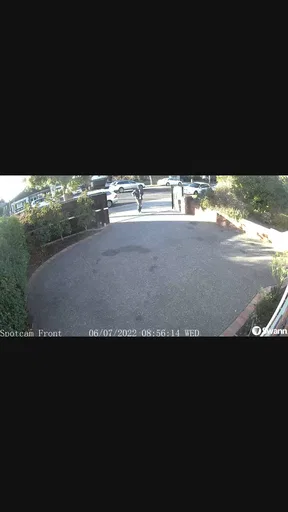
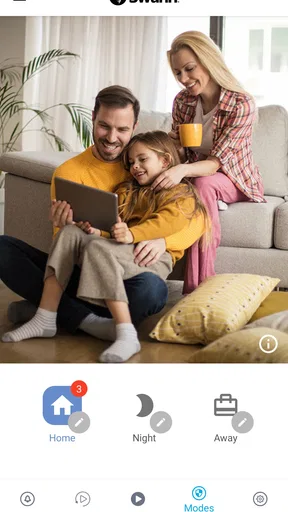
 Analysis by AppCompare
I find home security apps most useful when they support a calm, repeatable routine rather than encourage me to check a camera every few minutes. Swann Security is built around that kind of remote oversight: it brings compatible Swann equipment and its activity into one phone-based place. It’s a productivity app in an unusual sense, helping you manage the small task of staying aware of a home or business without needing to be there.
That distinction matters before you install it. The app is not a substitute for choosing and positioning the right security equipment, and it is not a general-purpose camera viewer for devices from any brand. Its value depends on whether Swann devices suit the place you want to monitor and whether checking alerts remotely fits your habits. When those pieces line up, it can make security feel more manageable; when they don’t, the app alone cannot fill the gap.
Decide what you need to monitor first
Before setting up a system, I’d list the specific situations I want to handle: checking that a door area is quiet, seeing whether a delivery has arrived, or reviewing an alert while I’m away. That keeps the setup focused. A camera aimed at a useful entrance can answer a practical question; several cameras pointed at low-importance areas can create more notifications and more checking without making the routine better.
This is where Swann Security differs from a typical productivity app. It does not organize projects or create a task list; its productivity comes from making a security check easier to carry out and easier to repeat. The app is free to install, but using it meaningfully depends on compatible Swann equipment, and some in-app purchases are offered. I’d treat the phone app as one part of the overall setup, not as a complete security system on its own.
Getting Started with Swann Security
First things first, downloading the Swann Security app is a breeze. It’s available on both Android and iOS, and it’s free! Once you’ve got it installed, setting it up is pretty straightforward. You’ll need to create an account, and then you can start connecting your Swann devices, like cameras and sensors, to the app.
The app’s interface is clean and user-friendly. Navigating through the features is intuitive, and even if you’re not the most tech-savvy person out there, you’ll likely find your way around with ease. They’ve made sure to keep things simple, which I appreciate.
Features That Stand Out
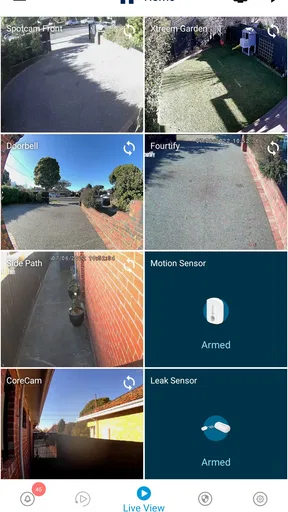
One of the coolest things about this app is its real-time video streaming. Yup, you can watch live footage from your cameras at any time. Whether you’re at work or on vacation, you can check in to see what’s going on back home. The video quality is impressive, capturing clear images both day and night.
Worth Reading Before You Choose

EA SPORTS FC Mobile 26 Is a Bigger Football Game, but It Takes Time

Flipboard Shows What News Apps Must Do Beyond the Feed

Switching to Android Auto Means Rethinking Your Driving Routine

Google Calendar Makes a Crowded Week Easier to Manage

Ludo King Makes the Most of the Minutes Between Plans

Baby Panda World Brings Quick Play to Modern Phones, but Its Game Library Feels Busy
A useful habit is to open a live view only when it answers a real question. For example, if a movement alert comes in while I’m away, I can check the relevant camera rather than repeatedly refreshing every view. That makes the stream a tool for deciding what to do next, not a feed to keep watching. The trade-off is that remote viewing relies on a working connection at both ends, so I wouldn’t treat one delayed load as proof that something is wrong at home.
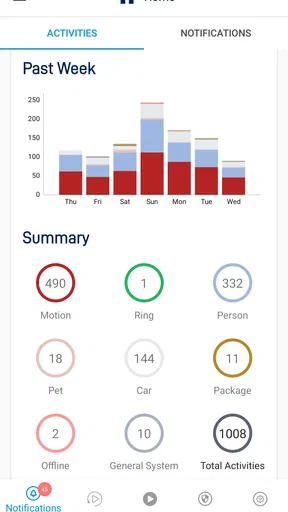
Another nifty feature is the motion detection alerts. The app notifies you whenever it detects movement, so you’ll always be in the loop. Plus, you can customize the settings to reduce false alarms, which is a nice touch. No one likes getting a ton of unnecessary notifications, right?
I’d tune those alerts around the actual activity of each space. A front entrance may deserve more attention than a room where movement is routine, and an alert that repeatedly turns out to be irrelevant is likely to be ignored eventually. This is a practical trade-off: tighter alerting can make notifications more useful, but it takes some attention to find a balance that suits the location and household.
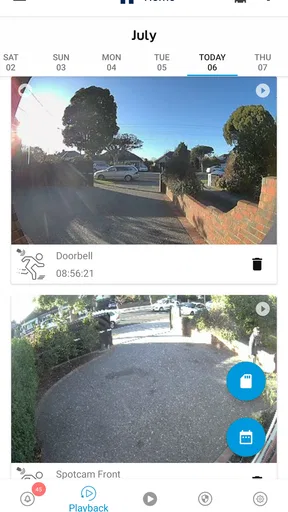
For those who love to keep things organized, you’ll appreciate the event history log. It allows you to go back and review past recordings, which can be really helpful if you missed an alert or need to revisit a specific event. It’s like having a personal video archive at your fingertips!
That history is most useful when I approach it with a question and a rough idea of when an event happened. If a notification was missed during a busy afternoon, reviewing the relevant period is more practical than scrolling without a purpose. It can also help you understand whether a camera is generating useful alerts or mostly capturing ordinary movement, which gives you a reason to revisit how you’ve set it up.
Make it a routine, not another interruption
A realistic routine might be to check the entrance before leaving, respond to an alert during the day only when it needs attention, and review a relevant event later if something was unclear. That is more sustainable than opening the app whenever you have a spare moment. It also helps distinguish an urgent signal from background activity, especially for someone who receives alerts while working or caring for others.
For a small business, the same approach can support a handover: one person can check an alert or review an event rather than relying on someone to watch a camera continuously. I’d agree within the household or team who is responsible for responding, though. If several people assume someone else has handled an alert, a shared app can create confusion instead of coordination.
Integration and Compatibility
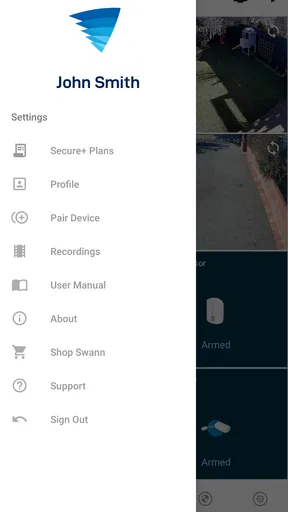
Swann Security doesn’t just stop at cameras. The app supports a variety of Swann devices, like alarms and doorbells, allowing you to create a comprehensive security system. It’s all about making your life easier and safer.
That ecosystem focus is also the main compatibility decision. If your home already uses equipment from several brands and you want one app to manage all of it, a broader smart-home platform may be a better fit. Swann Security makes more sense when you are choosing or already using Swann gear and want its supported devices handled together. I would check that your particular equipment is compatible before planning a setup around the app.
And let’s not forget about the integration with smart home systems. If you’re already using Google Assistant or Amazon Alexa, you’re in luck! You can control your Swann devices with simple voice commands. Imagine just saying "Show me the front door camera," and voilà, it’s right there on your screen.
Voice control can be handy when your hands are occupied, but I’d see it as a shortcut rather than the core of the security routine. If a camera view or a response matters, it is still sensible to check that the right device is showing and that the connection is working. For someone who rarely uses a voice assistant, this integration may add little; it should not be the deciding reason to choose the app.
Where the workflow can break down
Security apps are only as useful as the chain connecting the equipment, the home network, the phone, and the person responding. A weak internet connection can slow a live view, while a phone notification is less helpful if alerts are routinely silenced or overlooked. I’d test the ordinary workflow at home before depending on it during a trip: trigger a normal check, open the stream, and make sure the event history is understandable.
There is also a difference between an alert and a confirmed problem. Movement can have an ordinary explanation, so I’d use the video or event record as context before deciding what action is needed. That measured approach helps avoid treating every notification as an emergency. If your priority is uninterrupted professional monitoring or a system that works independently of your phone habits, compare those options directly rather than assuming an app-based setup provides the same service.
Privacy is another practical part of the decision. I’d think carefully about camera placement, especially in shared indoor spaces, and make sure people who live or work there understand what is being monitored. The app can make viewing convenient, but convenience is not a reason to cover every room. A few thoughtfully chosen views are often easier to manage than a broad setup that creates discomfort or constant checking.
Personal Experience and Opinion
Now, speaking from personal experience, I’ve found the Swann Security app to be quite reliable. The notifications are timely, and the video quality is consistently good. I’ve been able to monitor my home effortlessly, which has definitely added to my peace of mind.
However, like any app, it’s not without its quirks. Occasionally, the app might take a few extra seconds to load live footage, especially if your internet connection isn’t the strongest. But honestly, that’s a small price to pay for the level of security and convenience it offers.
On Android, the current release is version 4.6.7, and the app supports devices running Android 9 or later. It has an average rating of 4.6 from around 125,000 ratings, with more than a million installs. Those figures suggest it has reached a substantial audience, but I’d still judge it by the compatibility of your Swann equipment and the reliability of your own connection rather than popularity alone. It is rated for Everyone, while optional in-app purchases range from $1.99 to $199.99 per item.
Swann Communications is the developer, and the app has been available since May 16, 2019. Its scale and established release history make it a familiar option in the security-app space, but neither removes the need to test the setup that matters to you. My practical advice is to decide what you want to check, verify your device fit, and build a routine around meaningful alerts instead of trying to monitor everything constantly.
Who will get the most from it
I’d recommend considering this app if you use compatible Swann equipment, want remote access to its security functions, and prefer to review events yourself. It can suit a homeowner checking an entry while away, a family coordinating who will respond to an alert, or a small business owner who wants a convenient way to look back at activity. The strongest case is for someone who values a straightforward phone-based view of a Swann setup and is willing to fine-tune notifications as real-life patterns become clear.
I’d look elsewhere if you need one dashboard for mixed-brand equipment, dislike phone alerts, or expect the app to replace dedicated monitoring. It may also be a poor fit if you do not want to maintain a connected security setup or if checking video would create more anxiety than reassurance. Compared with a basic camera app, Swann Security’s appeal is its connection to a wider set of Swann devices; compared with a broad smart-home hub, that focus can be a limitation.
Final Thoughts
All in all, if you’re looking for a solid home security solution that you can easily manage from your smartphone, the Swann Security app is worth checking out. It combines functionality with ease of use, ensuring that you’re always connected to your home. With its comprehensive features and user-friendly design, it’s definitely a step in the right direction for home security enthusiasts.
So, what are you waiting for? Give it a try and see how it fits into your lifestyle. You might just find yourself wondering how you ever got by without it!
Pros
- Easy setup and installation process.
- High-quality video resolution.
- Remote access via mobile app.
- Customizable alerts and notifications.
- Integrates with smart home devices.
Cons
- Occasional app connectivity issues.
- Limited free cloud storage options.
- Some features require subscription.
- Notifications can be delayed.
- User interface could be more intuitive.
FAQs for Swann Security
What features does the Swann Security app offer?
The Swann Security app provides a comprehensive set of features, including live streaming, playback of recorded footage, push notifications for motion detection, and two-way audio communication. Users can also customize their security settings, such as adjusting sensitivity levels and setting specific motion zones to monitor.
Is the Swann Security app compatible with all Swann devices?
The app is compatible with a wide range of Swann security cameras and systems. However, it’s essential to check if your specific device is supported by visiting the Swann website or consulting the user manual, as older models might not be fully compatible with all features.
How secure is the Swann Security app?
Swann prioritizes user security by implementing encryption protocols to protect data transmitted between devices and the app. Users are encouraged to create strong passwords and enable two-factor authentication for enhanced security. Regular updates are also provided to address any potential vulnerabilities.
Can multiple users access the Swann Security app?
Yes, the Swann Security app allows multiple users to access the system, making it convenient for family members or trusted individuals. Users can be added or removed easily within the app settings, ensuring flexible and secure access management.
What should I do if I encounter issues with the Swann Security app?
If you experience any problems with the app, first ensure that your device is running the latest version and check your internet connection. Swann provides extensive support resources, including FAQs, troubleshooting guides, and customer support, accessible via the app or their official website.


